How much should an AI agent do on its own? A practical guide for small businesses
The useful question isn’t whether AI can answer your customers. It’s what it may do without asking you. Here’s a simple ladder, from draft to on its own, and how to move each job up it as the agent earns your trust.

Most conversations about AI customer service get stuck on one question: can it answer my customers? For the everyday questions, it usually can. Opening hours, "where's my order?" and "have you got this in stock?" all have a right answer sitting in your systems.
The more useful question is a different one: what should it be allowed to do without asking you? That isn't a technology question. It's the judgement you already make with a new staff member. On day one they watch. By the end of the month they're answering the phone. Months later they're handling refunds. Nobody hands a new starter the keys to everything on their first morning.
AI agents deserve the same treatment. Here's a simple way to think about it, and how it works with Colvy's AI agents.
The autonomy ladder
Every job an agent can do sits somewhere on a ladder. Each rung gives the agent a little more room:
| Rung | What the agent does | Who sends it | Good for |
|---|---|---|---|
| Off | Nothing | Nobody | Jobs you never want AI near |
| Suggest | Says what it would do | Your team, after writing it | Getting a feel for its judgement |
| Prepare | Writes the whole reply or change, ready to go | Your team, with one tap | Almost everything, to start |
| Within limits | Acts on its own, inside rules you set | The agent | Routine questions with a checkable answer |
| On its own | Acts without limits | The agent | Safe, internal actions only |
Two things matter about this ladder.
It's per job, not per agent. "The Support Agent" isn't one decision. Telling someone your opening hours and telling them a refund is approved are completely different risks. An agent can be trusted with one and not the other.
The top rung is rare. In Colvy, very little runs with no limits at all. The clearest example is the safest action there is: handing a conversation to a person. An agent never needs permission to ask for help.
Where Colvy starts: drafts
When you switch on Colvy's agents, anything a customer will see starts on the Prepare rung. The Support Agent looks up the order, checks the tracking and writes the reply. Then the reply waits in the conversation for someone on your team to send it. Reviews work the same way: the Reputation Agent drafts the reply, and a person posts it.
Jobs that stay inside your business get a little more room. Creating a task for your team, for example, is allowed within a daily limit, because a task nobody needed takes ten seconds to close.
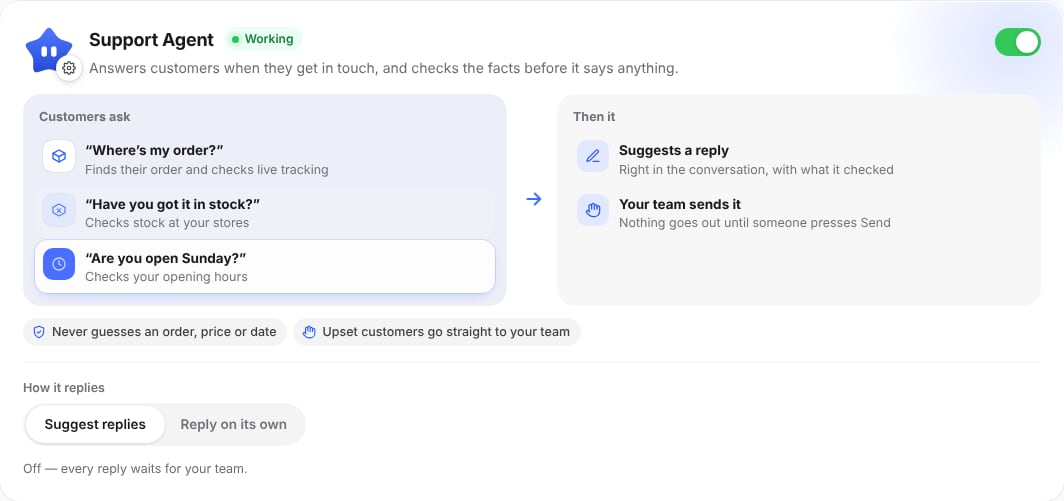
Drafts aren't a halfway house. They're how you find out whether the agent is ready. Every draft your team sends unchanged is a small vote of confidence. Every draft they rewrite tells you something too.
Moving a job up a rung
When the drafts for one kind of question keep going out untouched, that job is ready for the next rung. In Colvy, you switch the Support Agent's How it replies to Reply on its own, then choose exactly what that means:
- Which topics. Opening hours; order status, when tracking looks normal; stock questions; questions your knowledge answers; booking questions. Tick only the ones you're ready for.
- How many. The most replies on its own a day, and the most per conversation in an hour, so one busy conversation can't run away with it.
- Who for. Turn on Only for known customers and it only replies on its own when the texting number matches the customer's saved number.
One rule doesn't change: a reply only goes out on its own when it's backed by a lookup the agent made in that same run. If it didn't just check the hours, the stock or the tracking, the reply waits for a person. Anything else, or anything that looks wrong, waits for your team too.
The other agents have their own version of the same idea, each switched off until you turn it on:
| Agent | What it can do on its own | The limits |
|---|---|---|
| Reputation | Reply to good Google reviews | 4 and 5 star reviews, or 5 star reviews only, with a daily limit. Replies that mention an order number, phone, email or address wait for you |
| Reputation | Reply to friendly Facebook and Instagram comments | Questions, complaints and anything flagged as sensitive always wait for you |
| Sales | Follow up abandoned carts | A daily limit. One friendly follow-up, no invented urgency |
| Sales | Follow up quotes and enquiries gone quiet | After 2, 3, 5 or 7 quiet days, with a daily limit |
| Operations | Tell customers about late or stuck orders | A daily limit |
Let the record decide
You shouldn't have to guess when a job is ready. Colvy watches the track record for you.
When your team has decided at least 12 of an agent's drafts for the same kind of job in the last 30 days, sent at least 90% of them without changing a word, and dismissed none of the most recent ones, Colvy suggests moving that job up a rung. For example: let the Support Agent answer opening-hours questions on its own.
One tap applies the same setting you could have switched on by hand, with the same daily limits, and you can switch it back any time. Not now hides the suggestion for a while. Drafts nobody looked at don't count either way.

That's how trust works with people too: not a leap of faith, but a pattern you can point to.
Three safety rails worth having
Whatever tool you use, check it has these before anything replies on its own.
- One pause button for everything. In Colvy, Pause all agents stops everything that acts on its own straight away. Queued work is cancelled and new messages wait for your team. Suggestions already waiting stay for you to send or dismiss.
- A sandbox. Try an agent runs it against your real data, but nothing is sent, posted or changed. Anything it would do is recorded as a suggestion. It's the safe way to see how it handles a tricky message before a customer sends one.
- A record of why. Every run lands in Results: what each agent did, and why, with the context it used. When something looks off, you can see exactly what it looked at.
A sensible rollout
There's no prize for switching everything on in the first week. A pace that suits most small teams:
- First: drafts only. Every agent prepares and your team sends. Read the drafts properly.
- Next: one topic on its own. Opening hours, or questions your knowledge answers. Keep the daily limit low.
- Then: add topics as the record earns them. Stock, then order status. Let the earned-trust suggestions guide you.
- Reviews: 5 stars only, at first. Move to 4 and 5 once you like the replies.
- Some jobs stay human. Refunds, complaints and anything with money or a promise attached. We wrote a guide on which jobs to hand over first.
Before anything goes out on its own, spend ten minutes in Business memory, so the agent knows your tone, your rules and the facts it must never get wrong.
Read more about Colvy's five AI agents, or follow them through a busy Saturday at an aquarium shop. AI agents come with the Inbox and Everything plans: start free.
Key takeaways
- Decide autonomy per job, not per agent. Telling someone your opening hours and answering a complaint deserve different settings.
- Start everything a customer will see as a draft. Your team sends it, and every send shows whether the agent is ready.
- When a job goes on its own, give it limits: which topics, how many a day, and only when the facts were just looked up.
- Keep a pause button within reach. Stopping every agent should take one tap.
Bring every conversation into one inbox
Messages, calls, reviews and feedback — all in Colvy. Start free.
Get started free