Case study: How Colvy helped Roxy Aquarium bring scattered customer messages into one inbox
Roxy Aquarium’s customers wrote in from everywhere: email, the website, live chat, Facebook, Messenger and Instagram. The challenge, the solution and what changed when it all moved into one shared inbox in Colvy.

| At a glance | |
|---|---|
| Business | Roxy Aquarium |
| Industry | Aquarium and pet store |
| Where | Melbourne: more than one store, plus an online shop |
| The challenge | Customer messages scattered across email, the website, live chat, Facebook, Messenger and Instagram |
| The solution | One shared Colvy inbox for every channel, with one history per customer |
| Colvy features used | Shared inbox, Facebook and Instagram, email, live chat, website forms, calls and texts, locations, assignments and notes |
Fish keepers ask a lot of questions, and that's a good thing. What's in stock? Will this fish get along with the ones I've got? Why has the water gone cloudy? When will my order arrive? For Roxy Aquarium, the questions were never the problem. Where they arrived was.
The challenge: messages from everywhere
Roxy Aquarium's customers got in touch by:
- the website, through its contact form
- live chat on the online shop
- Facebook, as comments on posts
- Messenger
- Instagram, as messages and comments
Each one had its own app, its own notifications and its own history. Answering customers meant checking all of them, all day.
That's not anyone's fault. It's what happens when customer conversations are spread across apps that were each built for something else:
- Someone has to keep checking every app, or messages sit unseen.
- A message seen on one person's phone isn't seen by the rest of the team.
- Two people answer the same customer, or each assumes the other did.
- When a customer moves from Instagram to a phone call, the history doesn't come with them, so they explain it all again.
- Nobody can say, at a glance, what's still waiting for a reply.
With more than one store, there was one more question on top: which store is this customer talking to?
The solution: one inbox for every channel
Roxy Aquarium connected its channels to one shared inbox in Colvy:
- Facebook and Instagram: Messenger chats, Instagram messages, and comments on posts, all through the shop's Facebook Page.
- Email: the shop's email address, with attachments and replies kept in the thread.
- Live chat: Colvy's chat widget on the website.
- Website forms: enquiry forms that land as conversations, not emails to forward.
- Calls and texts: a business number for the shop.
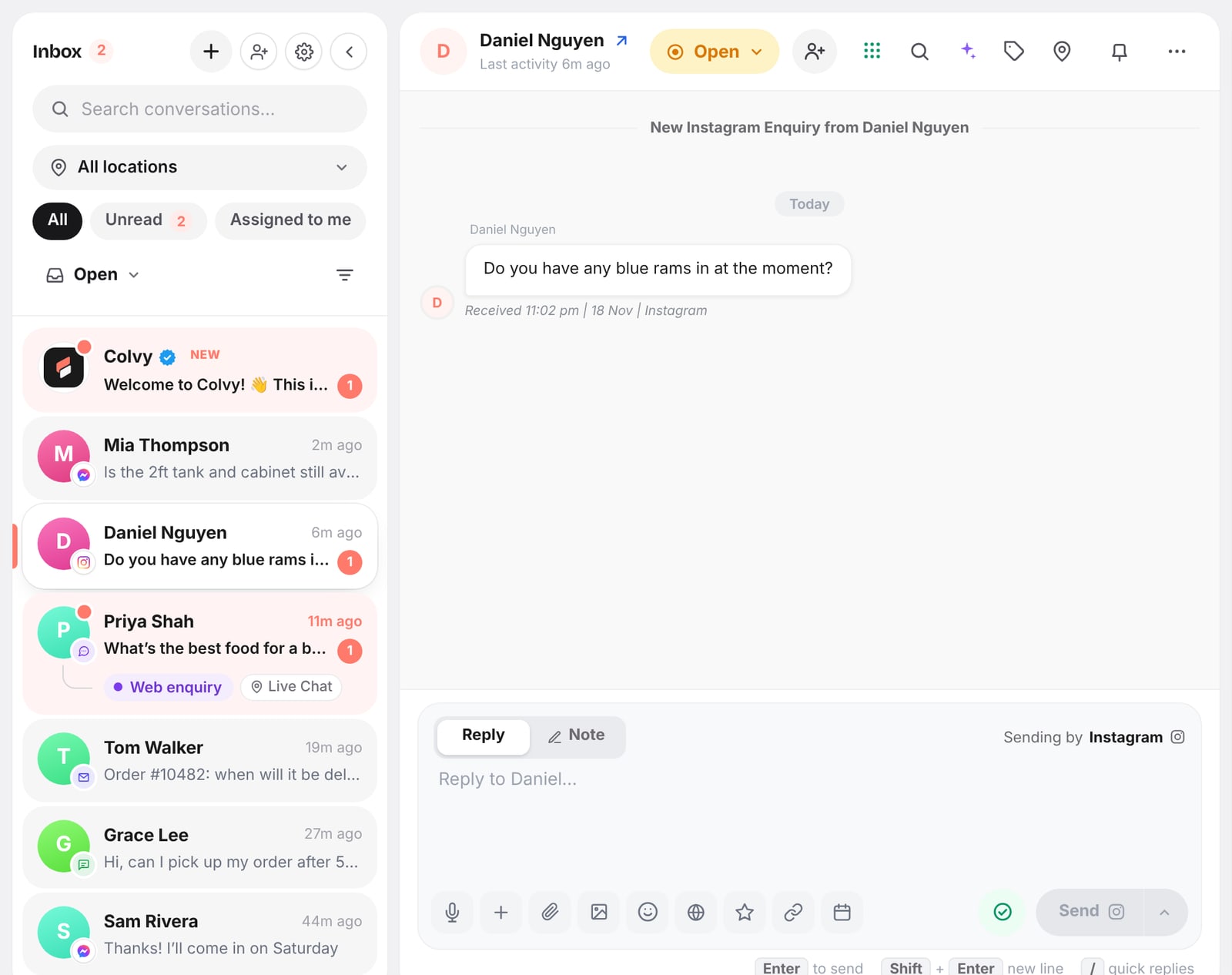
Each conversation shows where it came from, and the reply goes back the same way. A Messenger question gets a Messenger reply, and an email gets an email. The customer never has to switch apps to hear back.
One customer, one history
Customers don't stick to one channel. Someone might comment on an Instagram post, ask the price on Messenger, then call to check stock before driving in.
Colvy links those conversations to one customer, together with their orders from the online shop. So whoever picks up the next message sees the whole story: what they asked last time, what they bought and what's still open.
Clear on who's answering
With more than one store, "who's got this one?" matters. In Colvy:
- Each channel belongs to a store, and the inbox can show one store's conversations or all of them.
- A conversation can be assigned to the person handling it, so it's obvious who's on it.
- Internal notes and @mentions stay with the conversation, out of the customer's sight. A question for the other store doesn't need a separate group chat.
Nothing waits unnoticed
Unread conversations stay at the top with a count, and the team gets notifications on their phones from the Colvy app. When a customer has been waiting, the conversation shows for how long. What's waiting is visible to everyone, not just to whoever happened to see the notification.
Even Marketplace buyers find their way in
Facebook Marketplace chats go to a personal profile, and no app can read those. So each Marketplace listing gets its own page in Colvy, with the photos, price and details, plus buttons to chat, message the shop's Page on Messenger, text or call. Buyers can also text the listing's short code. Either way, the conversation arrives in the inbox with the listing attached.

The results
| Before | With Colvy |
|---|---|
| Six apps to check | One inbox |
| Each channel with its own history | One history per customer, with their orders |
| Messages seen by whoever's phone they reached | The whole team sees the same conversations |
| No clear owner for a reply | Assigned conversations, with notes for the team |
| Hard to tell what's waiting | Unread at the top, with how long each customer has waited |
Customers hear back from the business, not from whoever happened to see the notification. A new team member can pick up any conversation without asking what happened before.
Read next: how Colvy helped Roxy Aquarium grow, and why a business can't run on social media alone. See the shared inbox, or start free.
Key takeaways
- Customers pick the channel. A shop that answers in six places needs one place to see them all.
- One inbox means one history: whoever replies sees what was said before, on any channel.
- Stores, assignments and notes make it clear who is answering, so nobody gets two replies, or none.
- Start with the channels your customers use most, then add the rest.
Bring every conversation into one inbox
Messages, calls, reviews and feedback — all in Colvy. Start free.
Get started free