After-hours auto-reply examples (and how to send them automatically)
A good after-hours reply tells customers you got their message, when you’ll be back, and what to do if it can’t wait. Here are examples for shops, trades, salons, clinics and restaurants, for SMS, chat and email, plus how to send them only when you’re actually closed.
A customer messages you at 8:45pm. Nothing comes back. Maybe you'll see it in the morning, maybe it'll get buried under the overnight emails. Either way, from their side the business has gone quiet, so they try someone else.
An after-hours auto-reply fixes that in one line. It doesn't have to solve their problem tonight. It just has to tell them they've been heard.
What a good after-hours reply does
Three things, in this order:
- Confirms the message arrived. "Thanks for your message" is enough.
- Says when you'll reply. Be honest: "first thing when we open" or "by 10am tomorrow" if you can keep it.
- Offers a way forward if it can't wait. A booking link, an emergency number, your returns page.
And it uses their name if you have it. It's a small thing that makes an automated message feel less automated.
Examples you can copy
These use {first_name} and {business_name}, which Colvy fills in for you. Change the details to suit.
Shops and online stores
Hi {first_name}, thanks for your message! We're closed right now and will reply first thing when we open. If it's about an order, you can check its status anytime from the link in your order email.
Trades and home services
Hi {first_name}, thanks for getting in touch with {business_name}. We're off the tools for the day and will get back to you first thing tomorrow. If it's an emergency, like a burst pipe or no power, call us and follow the after-hours option.
Salons, barbers and beauty
Hi {first_name}! We're closed for the evening. You can book or move your appointment anytime online, and we'll reply to anything else when we open.
Clinics and practices
Thanks for your message, {first_name}. Our clinic is closed and messages aren't monitored after hours. We'll reply when we open. If this is a medical emergency, please call 000.
Cafes and restaurants
Hi {first_name}, thanks for your message! We're closed right now. You can book a table online anytime, and we'll answer anything else when we're back tomorrow.
Fit the reply to the channel
- SMS: keep it short. One or two sentences. Long texts are sent in several parts, and a short one reads better on a lock screen anyway.
- Website chat, Messenger, Instagram and WhatsApp: a little warmer is fine. An emoji won't hurt if it suits your brand.
- Email: you can carry more, like your opening hours and links to your FAQs, because people expect email to be longer.
Mistakes to avoid
- Promising a time you'll miss. "We'll reply within the hour" at 10pm sets you up to fail. "First thing when we open" is honest.
- Sending it during opening hours. A "we're closed" reply at 2pm on a Tuesday because the schedule was wrong is worse than nothing.
- Sending it again and again. Someone sending three messages in a row shouldn't get three identical replies.
- Answering things that need a person. An after-hours reply is an acknowledgement, not an answer to a complaint.
How to send it automatically in Colvy
In Colvy, the after-hours reply is a ready-made automation. Go to Settings → Automations, press New automation and pick After-hours reply. It has three steps:
- When a customer sends a message,
- Check "Open or closed": closed,
- Send a reply with your message.
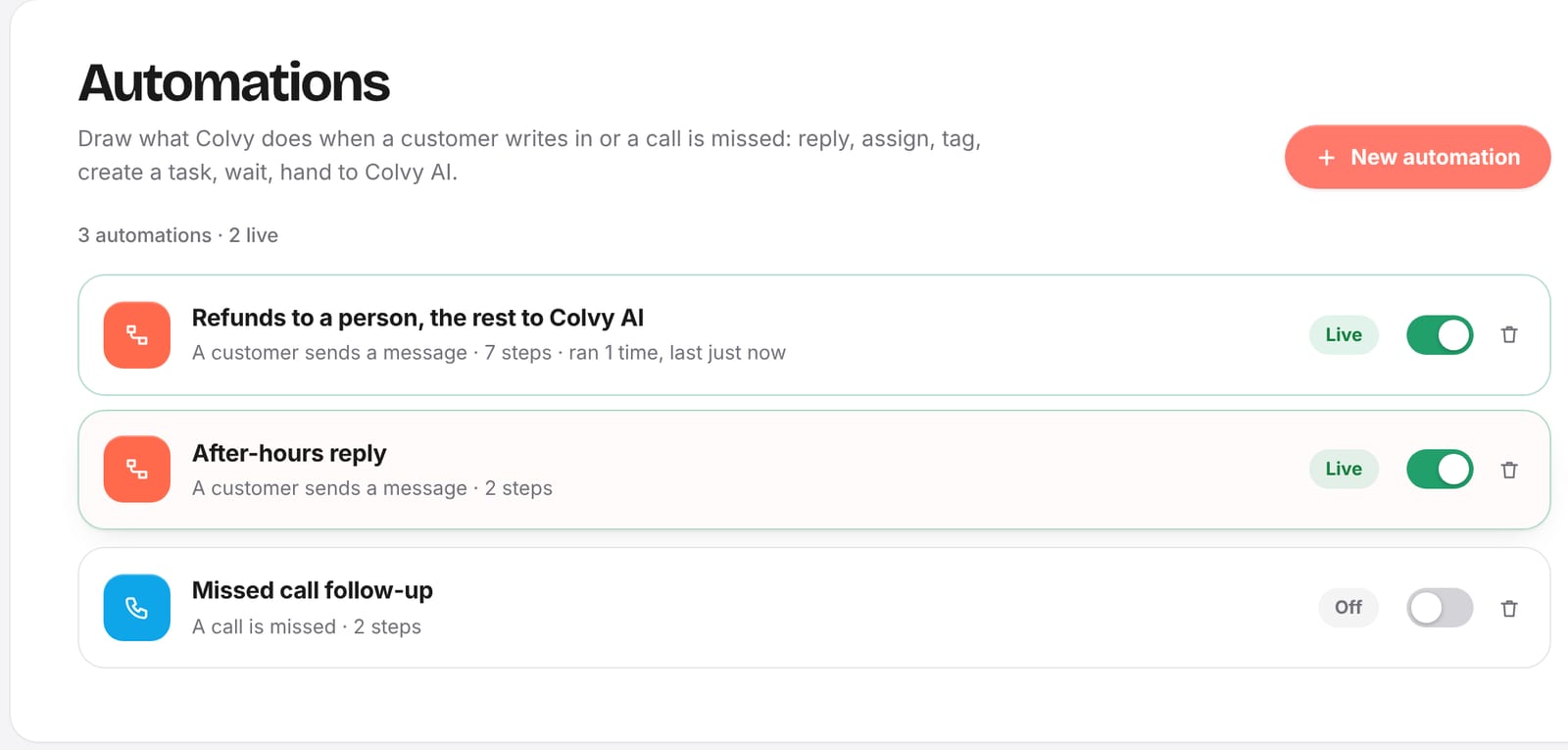
The check reads your opening hours from Business settings, so when your hours change, so does the reply. If you have more than one location, you count as open while any of them is open. Set your hours first, then press Try it to test the flow with "You're open right now" ticked and unticked before you switch it on.
The mistakes above are handled for you. The reply goes back on whichever channel the customer used, SMS, chat, email, Messenger, Instagram or WhatsApp, and by default it won't send again to the same conversation for 12 hours. A message only ever gets one automated reply. Spam, blocked senders and people who've opted out of texts never get one at all.
Want more ideas? See seven customer service flows worth drawing, or the full automation builder guide. Automations are included on the Inbox and Everything plans.
Start free and switch on your after-hours reply.
Key takeaways
- A good after-hours reply does three things: confirms the message arrived, says when you’ll reply, and offers a way forward if it can’t wait.
- Keep SMS replies short. Chat can be a little warmer, and email can carry more detail.
- Never promise a time you can’t keep. “First thing when we open” beats a time you’ll miss.
- Send it only when you’re actually closed: tie the reply to your opening hours, not a fixed schedule.
Bring every conversation into one inbox
Messages, calls, reviews and feedback — all in Colvy. Start free.
Get started free