How to build an automation in Colvy: a drag-and-drop guide
Colvy’s new automation builder lets you draw what happens when a customer writes in or a call is missed: checks, replies, assignments, tasks and waits, on every channel. Here’s how to build your first one, test it and switch it on.

Every business runs on rules nobody wrote down. Refunds go to Sam. If someone messages after close, tell them when you're back. If a first-time customer writes in, make them feel welcome. If nobody has answered in a quarter of an hour, somebody needs a nudge.
Those rules work until the person who knows them is busy, off sick or asleep. Colvy's automation builder lets you take them out of your head and draw them once. From then on they run on every message, on every channel, whoever's on shift.
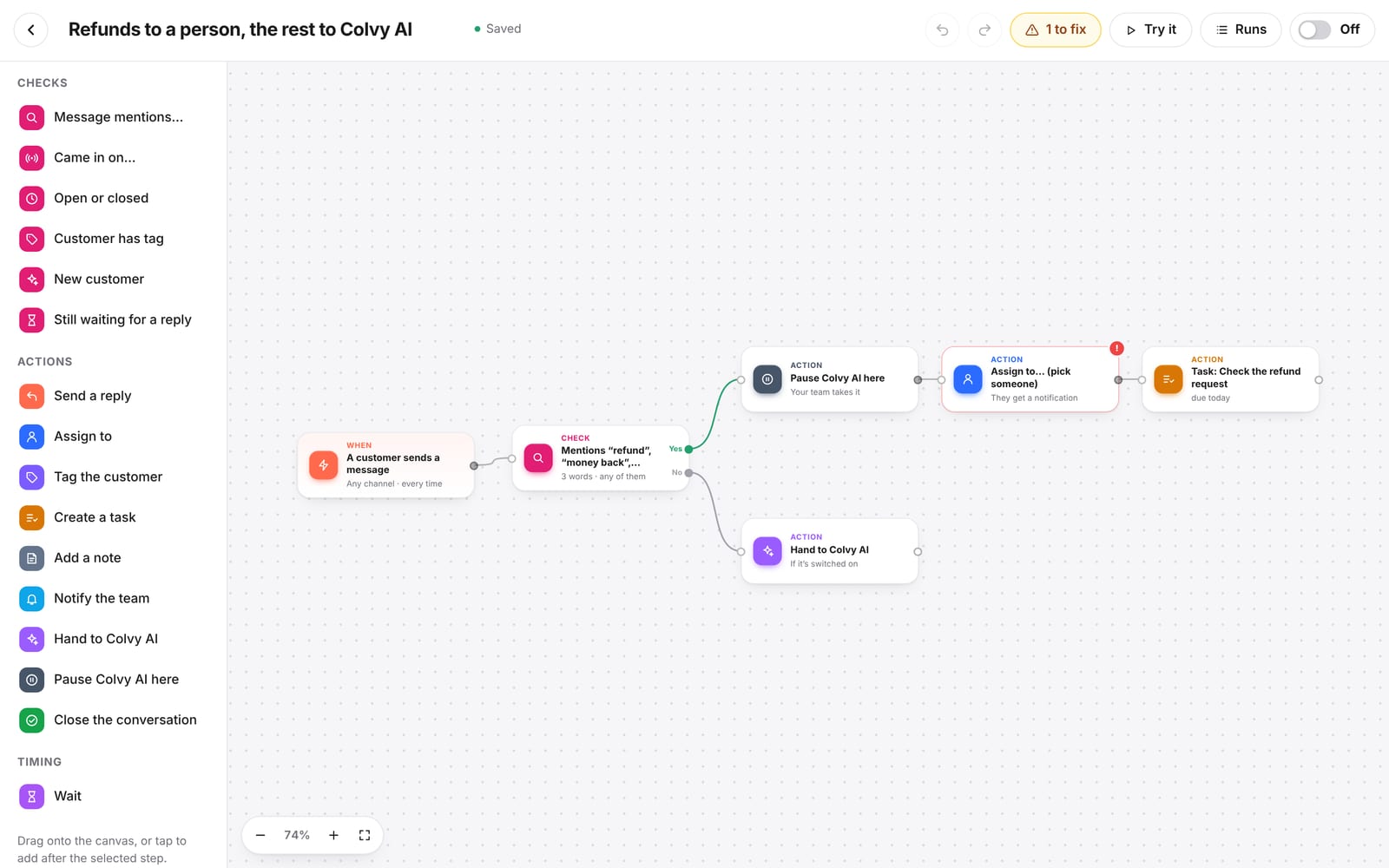
What an automation is made of
You build a flow from three kinds of step, joined by lines:
- The trigger is what starts it: a customer sends a message, or a call is missed. A message trigger can be narrowed to certain channels, or to only the first message of a conversation.
- Checks are yes-or-no questions. Each one has two exits, Yes and No, and you decide where each goes.
- Actions are what Colvy does: send a reply, assign the conversation, tag the customer, create a task, add a note, notify the team, hand to Colvy AI, pause Colvy AI, or close the conversation.
There's one more: Wait, which pauses the flow for anything from a minute to seven days before the next step.
These are the checks you can use:
| Check | Says yes when… |
|---|---|
| Message mentions… | the message contains any of the words you list |
| Came in on… | it arrived on a channel you picked |
| Open or closed | you're open (or closed) right now, by your opening hours |
| Customer has tag | the customer has that tag, like VIP or Wholesale |
| New customer | it's their first conversation with you |
| Still waiting for a reply | nobody on the team has replied since they wrote |
Flows work on website chat, SMS, email, Messenger, Instagram and WhatsApp, and a reply always goes back on the channel the customer used.
Build your first one in five steps
1. Start from a template
Go to Settings → Automations and press New automation. You can start from scratch, but a template is quicker:
- After-hours reply: when you're closed, let customers know when you'll be back.
- Refunds to a person, the rest to Colvy AI: messages about refunds go straight to someone on the team. Everything else, Colvy AI answers.
- Nobody replied in 15 minutes: if a customer is still waiting, nudge the team.
- Welcome new customers: tag first-timers and say a warm hello.
- Missed call follow-up: after a missed call, make sure someone calls back.
2. Drag, drop and join
The steps sit down the left. Drag one onto the canvas, then pull a line from the dot on one step to the next. Checks have a Yes dot and a No dot, so one flow can go two ways. On a phone, tap a step to add it after the one you've selected.
Click any step to set it up: the words to look for, who to assign to, the reply to send. Replies can use {first_name}, {name} and {business_name}, so "Hi {first_name}" reads as "Hi Priya".
3. Fix what it flags
If something isn't finished, the top bar tells you how many things need fixing and the step gets a red dot. Pick someone to assign to, type the tag, write the reply. You can't switch a flow on while anything is left unfinished, so a half-built flow never reaches a customer.
4. Try it
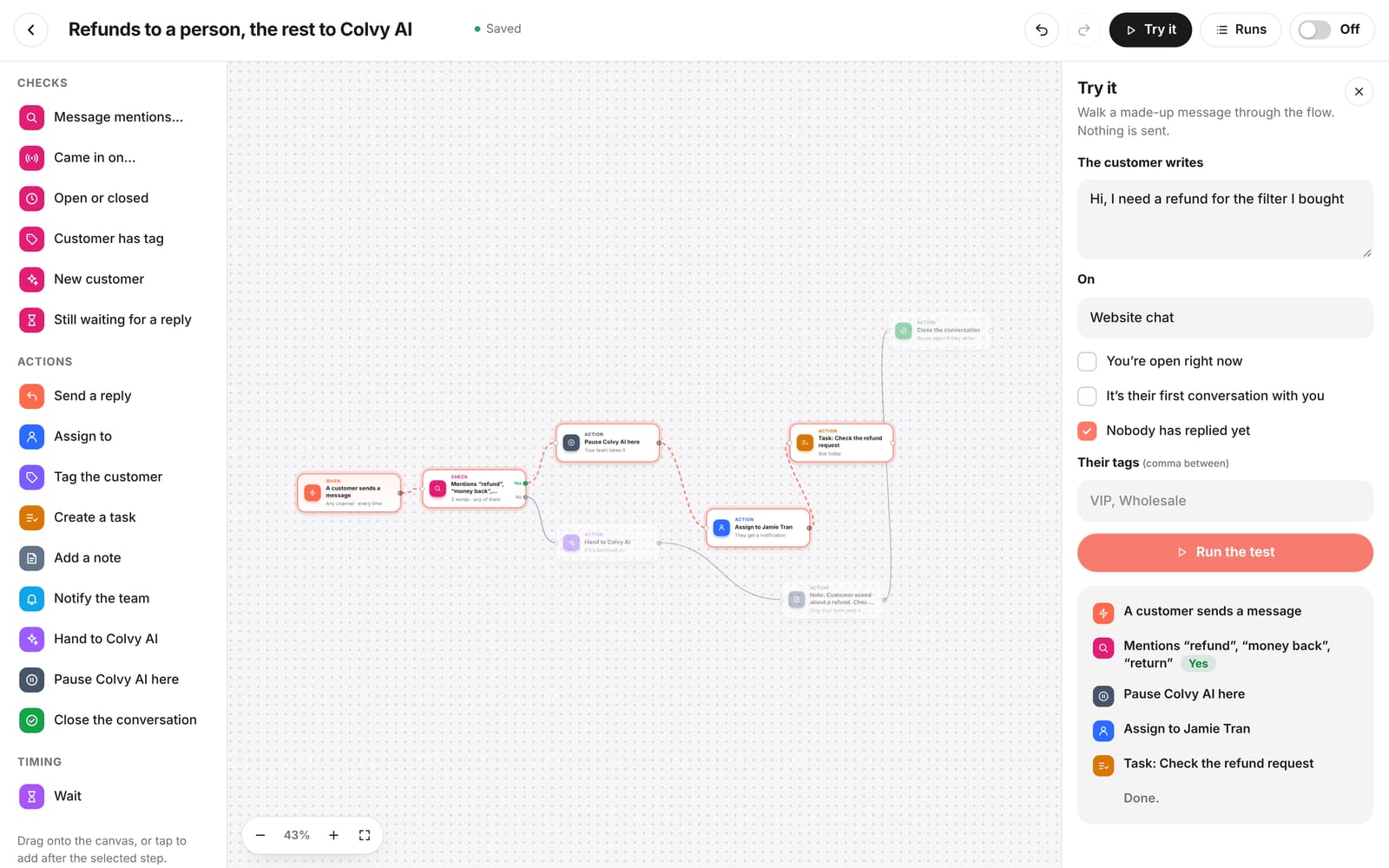
Press Try it, type a made-up message, pick a channel, and tick whether you're open, whether it's their first conversation and whether anyone has replied. Then run the test. The path lights up on the canvas and each step is listed on the right, so you see exactly what would happen. Nothing is sent and nothing changes.
5. Switch it on and read the runs
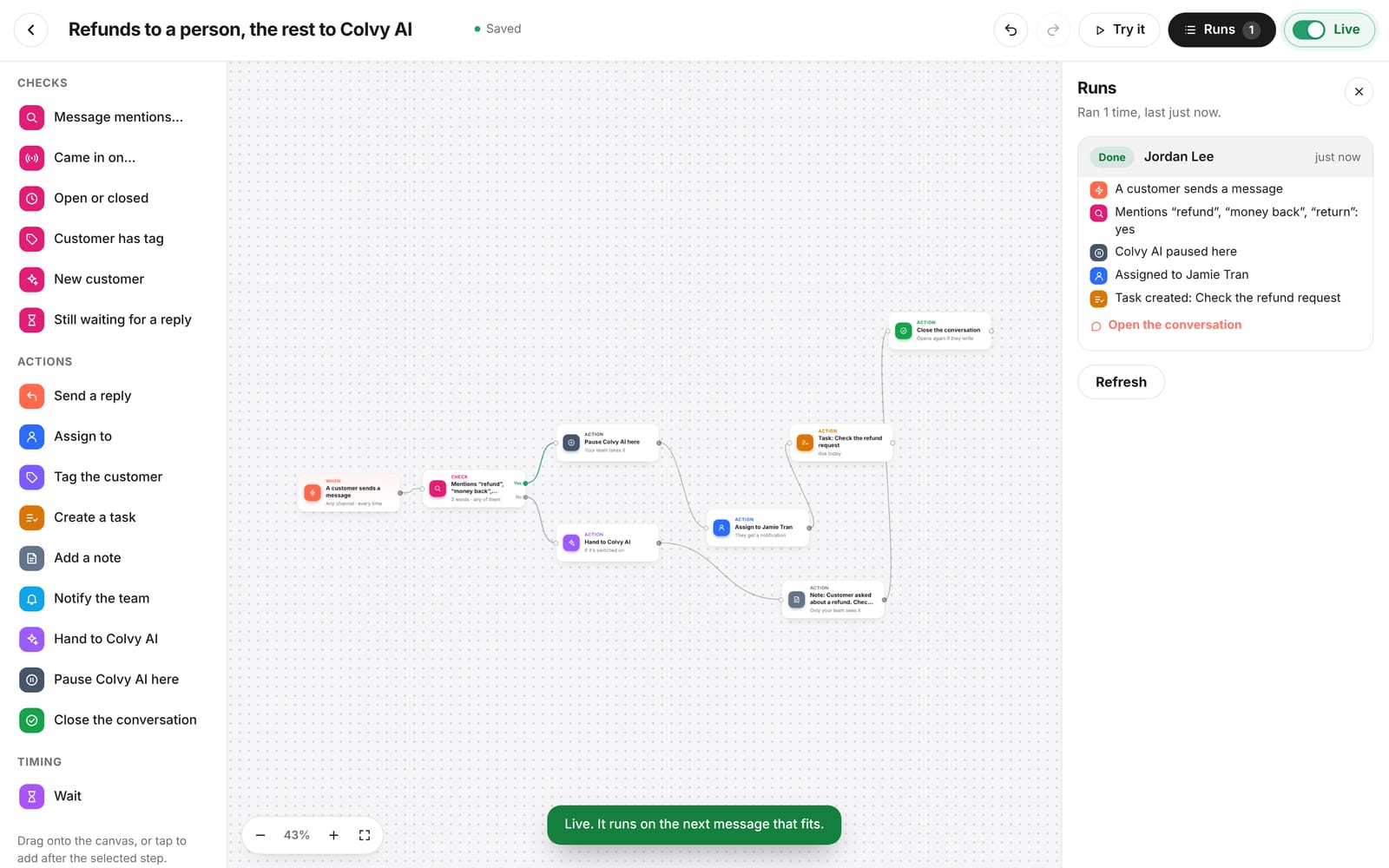
Flip the switch in the top corner and the flow is live. Every time it runs you'll find it under Runs: who it ran for, which way each check went, what it did, and a link straight to the conversation.
How it works with Colvy AI
If you use Colvy AI to answer customers, you choose where automations stop and the AI starts.
- When a flow sends a reply, Colvy AI stays quiet on that message, so the customer never gets two answers.
- Hand to Colvy AI passes it over on purpose: the AI answers even if the flow already sent a quick reply. After a Wait, it answers the customer's latest message.
- Pause Colvy AI here stops the AI answering that conversation, so your team takes it. That's how the refunds template works: refunds pause the AI and go to a person, everything else is handed to the AI.
Safe by default
Automations talk to your customers, so the builder is careful for you:
- One automated reply per message. Two flows can't both answer the same text.
- A breather between runs. By default a flow won't run again for the same conversation for 12 hours. You can change that per flow, from every message to longer.
- A daily cap. Each flow runs at most 500 times a day, so a mistake can't run away with your SMS credit.
- No replies to spam, blocked senders or people who've opted out of texts.
- Waits are bounded: from one minute to seven days, and at most five on any path.

Which plans include it?
The automation builder is part of the Inbox and Everything plans. See pricing for the details, or read more on the automation builder page.
Ready for more? Learn how to route messages to the right person, use rules and AI together, follow up automatically and pick keywords that work.
Start free and draw your first automation.
Key takeaways
- An automation is a trigger, a few yes-or-no checks and the actions you want, drawn on a canvas. No code.
- Start from a template: after-hours reply, refunds to a person, nobody replied in 15 minutes, welcome new customers or missed-call follow-up.
- Try it walks a made-up message through your flow and lights up the path. Nothing is sent.
- Limits are built in: one automated reply per message, a wait before the same flow runs again for a conversation, and a daily cap per flow.
Bring every conversation into one inbox
Messages, calls, reviews and feedback — all in Colvy. Start free.
Get started free