Rules or AI? How to use automations and AI together in customer service
Rules are predictable. AI is flexible. The best customer service set-ups use both: rules decide who handles what, and AI answers the everyday questions. Here’s how to split the work, with five patterns you can draw in Colvy.

There's a lot of noise about AI replacing customer service. In practice, the businesses that get the most out of it use AI for what it's good at and rules for what rules are good at.
Here's how we think about the split, and five patterns you can draw in Colvy's automation builder to put both to work.
What rules are good at
A rule does exactly what you told it, every time. "If the message mentions a refund, give it to Sam." No judgement, no surprises.
That makes rules right for decisions that should never vary: who handles money, who looks after your biggest customers, where complaints go. They're instant, and they're explainable. In Colvy, every run is listed under Runs with each step in plain words, so you can always see why something happened.
What rules can't do is understand. A keyword rule only knows the words you gave it.
What AI is good at
AI understands a question however it's worded. "R u open sunday", "what time do you shut on the weekend" and "Sunday hours?" are the same question to Colvy AI, and it can answer from what it knows about your business.
That makes AI right for the long tail of everyday questions. What it shouldn't do on its own is make sensitive calls: approving a refund, calming a furious customer, deciding what a VIP gets.
| Use a rule when… | Use AI when… |
|---|---|
| The answer must be the same every time | The question can be asked a hundred ways |
| Money, complaints or VIPs are involved | It's a routine question about hours, stock or prices |
| You need to know exactly why something happened | Speed matters more than a human touch |
| A specific person must handle it | Anyone, or anything, could answer it well |
How they work together in Colvy
Three steps in the builder decide how a flow and Colvy AI share a conversation:
- Send a reply. The flow answers. Colvy AI stays quiet on that message, so the customer never gets two answers.
- Hand to Colvy AI. Colvy AI answers the customer (when it's switched on for that channel), even if the flow already sent a quick reply. After a Wait, it answers the customer's latest message.
- Pause Colvy AI here. Colvy AI stops answering that conversation, and your team takes it.
And one rule sits over all of it: one automated reply per customer message, however many flows match. If two flows would both reply, the one you made first replies, and the other skips its reply but carries on with its other steps.
Five patterns
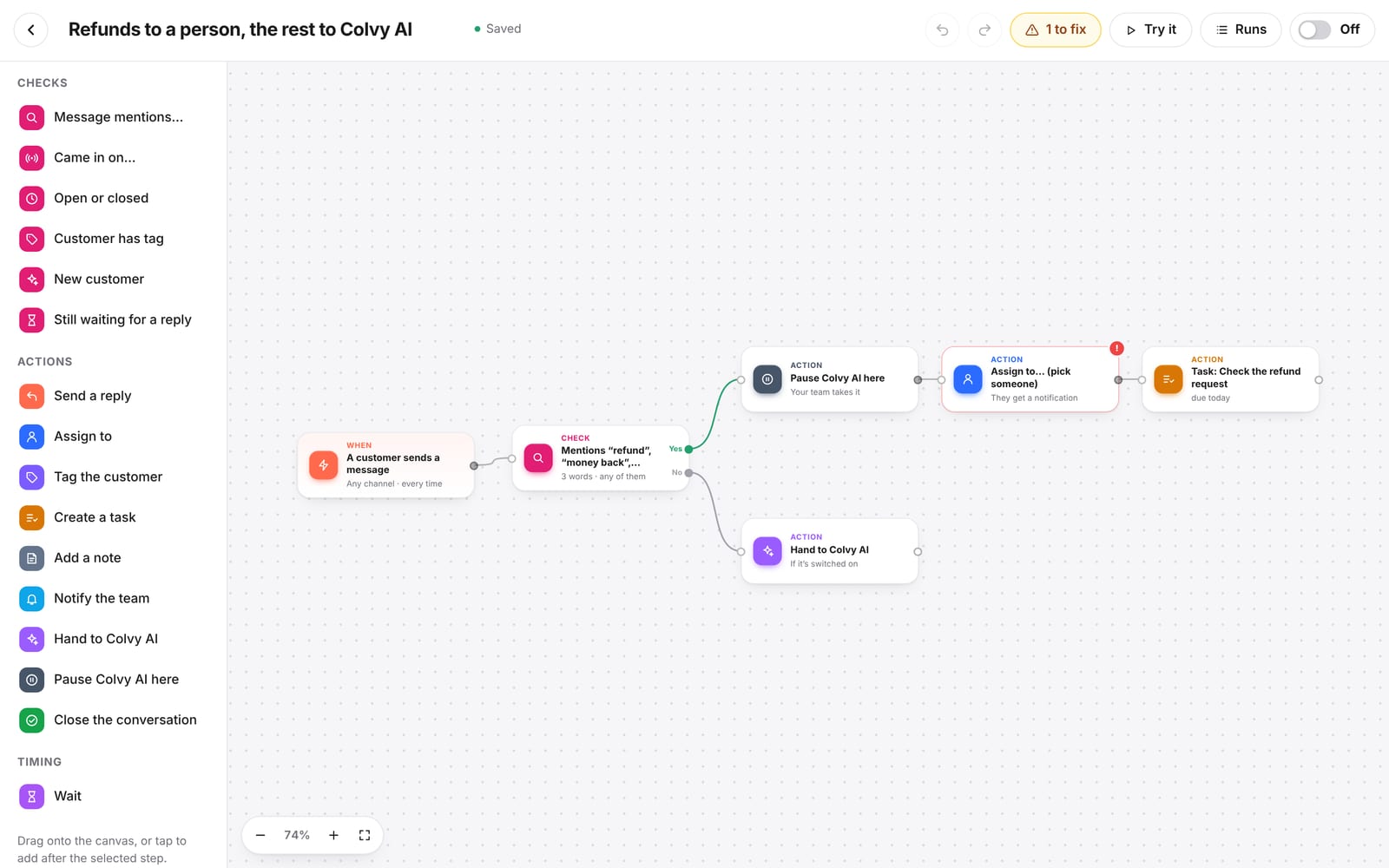
1. Refunds to a person, the rest to AI
When a customer sends a message → Mentions "refund", "money back", "return"? Yes: Pause Colvy AI here, Assign to the person who handles refunds, Create a task to check it today. No: Hand to Colvy AI.
This one's a ready-made template in Colvy.
2. VIPs always get a person
Customer has tag "VIP"? Yes: Pause Colvy AI here, then Assign to their account manager. Your best customers never get a bot, and the account manager is told straight away.
3. Complaints go to the owner
Mentions "complaint", "disappointed", "unhappy", "unacceptable"? Yes: Pause Colvy AI here, Assign to the owner, and Add a note for context. Keyword lists can't catch every unhappy customer, so keep an eye on your inbox too. But they catch the ones who say so plainly.
4. Welcome first, then AI
Trigger on the first message of a conversation. New customer? Yes: Send a reply with a warm welcome using their first name and your business name, then Hand to Colvy AI so their actual question gets answered too.
5. Team first, AI as a backup
Send a reply: "Thanks for your message, someone will be with you in a few minutes." Then Wait 10 minutes. Then Still waiting for a reply? Yes: Hand to Colvy AI, and it answers the customer's latest message. No: the team got there, so the flow simply ends.
The quick acknowledgement doesn't count as an answer, so the check after the Wait only looks at real replies from your team or Colvy AI.

A few honest notes
- Colvy AI has to be switched on for a channel before Hand to Colvy AI can answer there.
- If Colvy AI has been paused on a conversation, a later hand-off won't wake it up. Your team has that conversation.
- Automations never run for spam or blocked senders, and never text someone who's opted out of texts.
Use Try it to see which way a message would go before you switch a flow on, and read how to build an automation for the basics. Automations are on the Inbox and Everything plans.
Start free and give rules and AI their own jobs.
Key takeaways
- Use rules for decisions that must be the same every time: who handles refunds, VIPs and complaints.
- Use AI for the long tail of everyday questions: opening hours, stock, prices, how-tos.
- In Colvy, a customer gets one automated answer per message. A flow’s reply wins, unless the flow hands over to Colvy AI on purpose.
- Team first, AI as backup: acknowledge, wait a few minutes, and only hand to Colvy AI if nobody on the team has answered.
Bring every conversation into one inbox
Messages, calls, reviews and feedback — all in Colvy. Start free.
Get started free