12 team challenge ideas that actually help your customers
A good challenge points the whole team at something customers will feel: more conversations properly resolved, every call picked up, more happy reviews. Here are twelve to run in Colvy Powers, with example targets and rewards.

A challenge is the simplest way to point a whole team at the same thing for a day or a week. Pick the right thing and customers feel it: fewer people waiting, calls picked up, problems actually solved. Pick the wrong thing and you get a burst of busywork.
Here are twelve challenges worth running in Colvy Powers, and how to set targets that are fair.
How challenges work in Colvy Powers
An owner or admin adds challenges in Settings → Colvy Powers. Each one has:
- Who it's for: each person daily, each person weekly, or the whole team weekly.
- What counts: conversations resolved, customer replies, calls answered, tasks completed, jobs completed, orders fulfilled, thanks received or happy reviews.
- A target and a reward in coins and XP.
Daily challenges reset each day in your business's time zone. Weekly ones run Monday to Sunday. A whole-team challenge pays everyone who helped when the team reaches the target.
Progress counts the same checked rewards as everything else in Colvy Powers, so challenges can't be gamed either. One-word replies, notes and AI replies don't count toward a reply challenge, and a call has to last at least 20 seconds.
Each person, daily
Short, achievable goals that give a normal day a little shape.
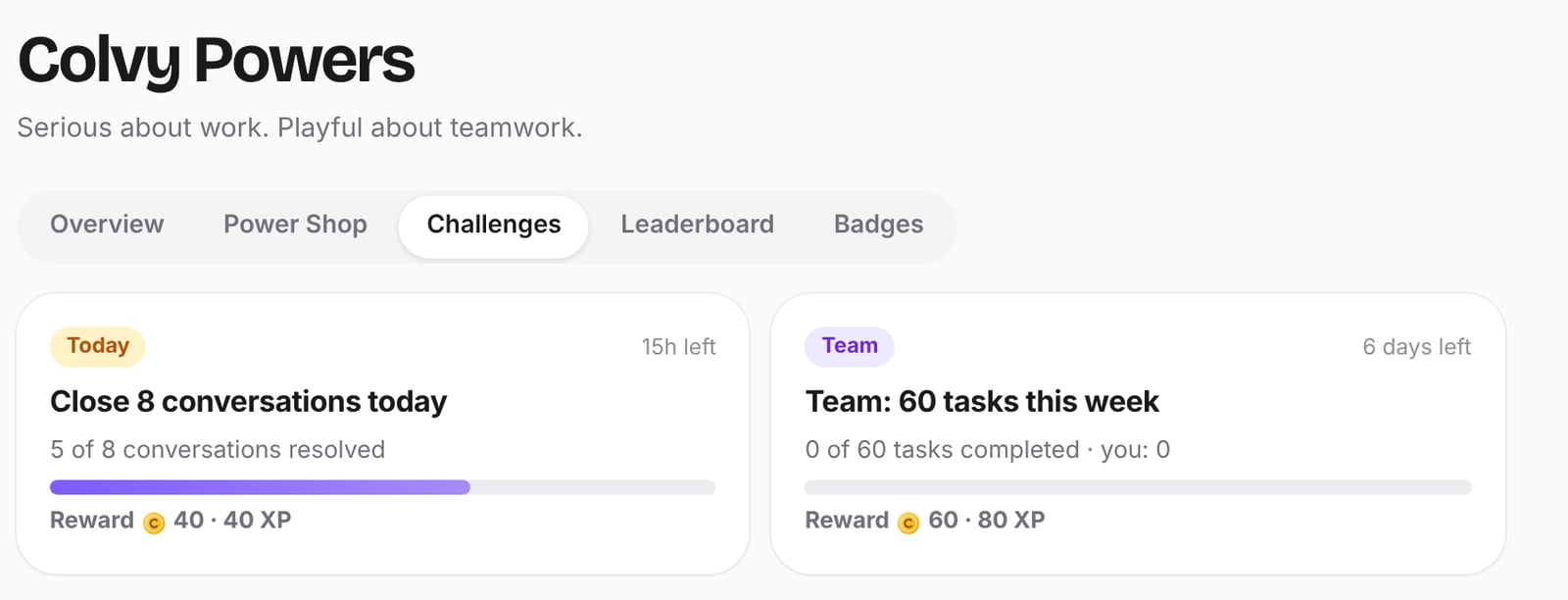
1. Close 8 conversations today. Conversations resolved, target 8. A resolve only counts after a real reply, so this rewards actually finishing things.
2. Answer 20 customers today. Customer replies, target 20. Each customer message is answered once, by whoever replies properly first, so this can't be padded by splitting one answer into three.
3. Pick up the phone. Calls answered, target 10. Useful on days you know will be busy, like after a newsletter goes out.
4. Out the door. Orders fulfilled, target 15. For shops: orders you mark shipped, collected or completed in Colvy.
Each person, weekly
A bit more room, so one slow day doesn't sink it.
5. Clear your list. Tasks completed, target 15. Tasks count when they're assigned to you, but one you made yourself and ticked within ten minutes doesn't, so this rewards follow-ups actually getting done.
6. Signed off. Jobs completed, target 5. For trades and service teams: everyone assigned to the job counts it.
7. Someone's hero. Thanks received, target 3. Keep the reward small on this one. Each person can thank up to three teammates a day, and on a tiny team you don't want it to become a swap.
8. Named in a review. Happy reviews, target 1. A 4 or 5 star Google review that names you. Pair it with a gentle habit of asking happy customers for a review.
Whole team, weekly
These are the ones we'd start with. Everyone pulls together, and everyone who helped gets the reward.
9. Team: 60 tasks this week. Tasks completed, target 60. Great for clearing the backlog of call-backs and follow-ups.
10. The big clear-out. Conversations resolved, target 100. Pick a week after a sale or a busy weekend.
11. Every call counts. Calls answered, target 80. Best during your busiest season.
12. Five-star week. Happy reviews, target 3. A nice one to celebrate when it lands.

Example targets and rewards
The numbers above are examples for a small team. Set yours from a normal week, not a record one.
| Challenge | Who | Example target | Example reward |
|---|---|---|---|
| Close 8 conversations today | Each person, daily | 8 | 40 coins, 40 XP |
| Clear your list | Each person, weekly | 15 tasks | 80 coins, 80 XP |
| Team: 60 tasks this week | Whole team, weekly | 60 tasks | 60 coins, 80 XP each |
| Five-star week | Whole team, weekly | 3 reviews | 100 coins, 100 XP each |
How to pick a fair target
- Look at last week first. The leaderboard shows counts by week or month, for resolved conversations, replies, calls, tasks, jobs, orders and thanks.
- Aim for a good, normal day. If nobody finishes a challenge, people stop looking at challenges.
- Remember the daily limits. Once someone has used up both their daily coins and XP, more work that day stops counting toward challenges too. Keep daily targets to a good day's work, or raise the limits.
- Reward weekly and team challenges more than daily ones. The form starts at 50 coins and 50 XP, which suits a daily challenge.
Challenges to avoid
- Anything about speed alone. It pushes people to grab easy conversations and leave hard ones.
- Ones only one person can win. Use a whole-team challenge instead.
- Targets that pull people away from customers, like a thanks challenge so big that people start trading thank-yous.
Run one or two at a time, and swap them every few weeks. For the full set-up, see how to set up Colvy Powers.
Start free and set your team's first challenge.
Key takeaways
- Pick challenges customers would thank you for, not ones that just make a number go up.
- Whole-team challenges pay everyone who helped, so nobody has to beat a colleague for the team to win.
- Set targets a good, normal day or week reaches. A challenge nobody finishes teaches people to ignore challenges.
- Run one or two at a time, and change them every few weeks so they stay fresh.
Bring every conversation into one inbox
Messages, calls, reviews and feedback — all in Colvy. Start free.
Get started free